Open source · OPPO Find X9 series · No root
Remap the OPPO Snap Key to open any app
Press the key, land in Claude Code
SnapKey Mapper turns the Snap Key of the Find X9 and Find X9 Pro into a launcher for the app or link you choose. Single press, double press or long press.
- No root No bootloader unlock
- No Wi-Fi needed Works on mobile data
- Nothing collected Open source, verifiable
- Open source About 1000 lines, MIT
Examples
One key. Anything that opens from a link.
Pick an installed app, paste a link, or write an intent: link for anything Android can do. A few ideas:
-
Link
Jump into Claude Code
Your running Claude Code session, one press away. Talk to your agent like a walkie-talkie, from the street, Wi-Fi off.
https://claude.ai/code/[SESSION] -
Link
Navigate, hands busy
Google Maps turn-by-turn to a saved place, by bike or by car.
google.navigation:q=[PLACE]&mode=b -
Link
Your run playlist
spotify:playlist:[ID] -
App
Strava, ready to record
App: Strava -
Link
Today's notes doc
docs.google.com/document/d/[DOC_ID] -
Intent
A 5-minute timer
intent:#Intent;…LENGTH=[SECONDS];… -
Link
The garage dashboard
Home Assistant opens straight on the right page. Lights, door, heating.
homeassistant://navigate/lovelace/[VIEW] -
Link
Fire a workflow
Open a webhook URL that accepts GET (n8n, for example): log a coffee, start a timer, ping your team.
https://[HOST]/webhook/[PATH] -
Link
One WhatsApp chat
https://wa.me/[NUMBER] -
Link
Call someone
The dialer opens with the number ready.
tel:[NUMBER] -
Link
A Notion page
Your inbox, journal or shopping list.
https://www.notion.so/[PAGE] -
App
Your AI assistant
ChatGPT, Gemini, Claude, Perplexity: whichever you prefer to OPPO's.
App: any -
App
Or any installed app
Camera alternatives, password manager, voice recorder, banking, translator. Pick it from the list in SnapKey Mapper.
With Claude Code
If it can be launched, Claude Code can wire it to the key
Most apps open from a link, but nobody knows those links by heart. Ask Claude Code what you want the Snap Key to do. It finds the deep link, tests it on your phone over ADB, and gives you the line to paste in SnapKey Mapper.
- Finds the right link for the app and the screen you want
- Tests it before you touch the phone settings
- Writes the webhook or shortcut behind it when there is no link yet
- Can even install SnapKey Mapper and grant its permission for you
Add the SnapKey Mapper plugin to Claude Code:
/plugin install snapkey-mapper --marketplace Damien-llado/snapkey-mapperClaude Code runs on your computer. To test a link on the phone, connect it with a USB cable (USB debugging on) or with wireless debugging on the same Wi-Fi. Without it, Claude still finds the link, and you check it with the app's Test button.
The use case that started it: the author runs Claude Code on a home server and talks to it from the phone through Remote Control. OPPO's settings could not open that conversation, Key Mapper only could while Wi-Fi was on. So this app was written, and it has been in daily use since October 2026.
I want my Snap Key to start bike navigation to the climbing gym.
Google Maps accepts a navigation link. Testing it on your phone:
adb shell am start -a android.intent.action.VIEW \
  -d "google.navigation:q=Climbing+Gym+Lyon&mode=b"
Navigation started. Paste this link in SnapKey Mapper:
google.navigation:q=Climbing+Gym+Lyon&mode=b
Shortcut library
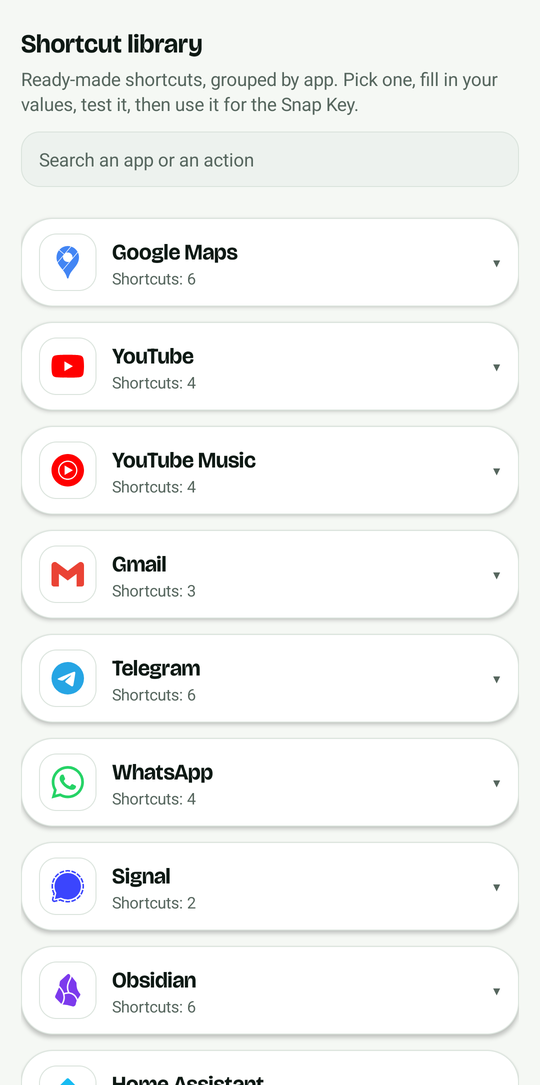
Do not know the link? Pick a shortcut
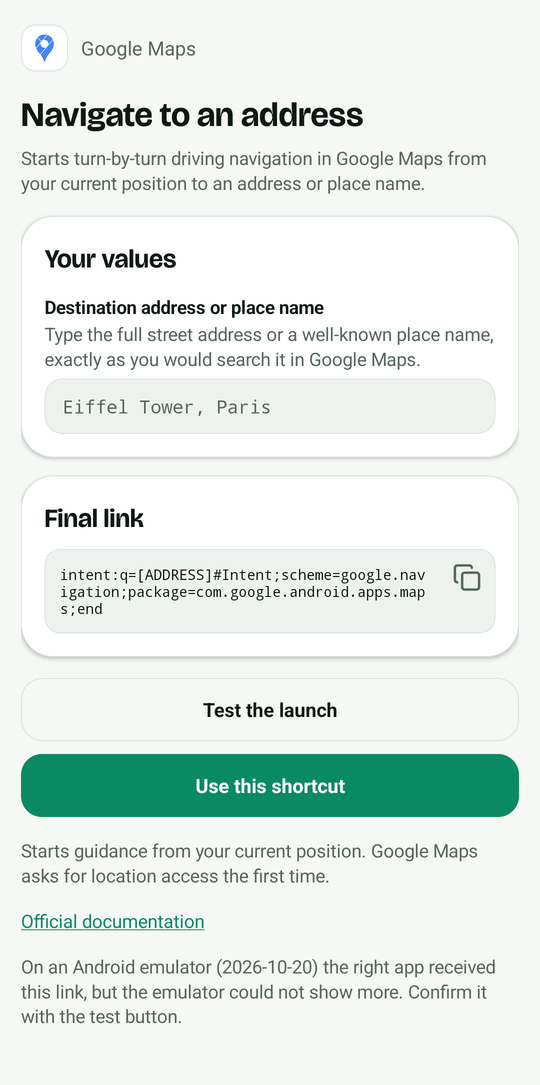
The app comes with a library of ready-made shortcuts, grouped by app: start a timer, set an alarm, open the camera, call a number, write a text, navigate to a place, open a playlist or a chat. Pick one, fill in your values, test it and use it for the key.
- Grouped by app, with the official logos
- One field per value, with a hint on where to find it
- Live preview of the final link, with copy and test buttons
- Every shortcut checked on an Android emulator, with a link to the official page that documents it
Checked on an emulator is not checked on every phone: the clock, camera and settings apps differ on ColorOS, and some apps need an account. The test button in each shortcut tells you in one tap.
Under the hood
How it works, honestly
On ColorOS 16 the Snap Key can only do what OPPO lists: AI Mind Space, camera, flashlight, recorder, translate, screenshot, sound mode or do not disturb. There is no "open an app" option, and remapping apps cannot see the key unless a debugging connection stays on. SnapKey Mapper works around that by watching what ColorOS already records.
ColorOS logs every press
The system log gets a line with
KEYCODE_ACTION_BUTTON_CLICK. SnapKey Mapper reads the log, spots that line and opens your app or link.No root, no accessibility
Reading the log needs one permission,
READ_LOGS, granted once with a single command. It stays after a reboot.Nothing collected
In the app: no account, no tracker, no ads. It keeps only your target, the key name and the gesture, on your phone. The lite edition has no internet permission at all, so Android does not let it open network connections itself.
Safe to install
What Android will show you, and why it is fine
SnapKey Mapper is not on Google Play, so Android adds a few checks. They are normal for any app installed from a website. The exact wording depends on your phone.
- A warning that the file might be harmful, in Chrome. It shows for every APK downloaded from the web. Confirm the download.
- "Install unknown apps". Android asks you to allow your browser or file manager to install apps. Allow it, install, then switch it back off if you like.
- "Play Protect hasn't seen this app before". The app is new, so Google offers to check it. Tap Scan app: it takes a few seconds.
- "Harmful app blocked". Google Play Protect can show this message and stop the install. It happens because the app comes from GitHub, not from Google Play, and asks for sensitive permissions (reading the system log, displaying over other apps) from a developer Google has not verified yet. It is not a finding that the app is malicious. Before you go on, check that the signing certificate of the APK has the SHA-256
a4a6d83d2298e8a88a6da748a3cc9ae9051e459a1d6e06b098a27d2b87f8f796(with AppVerifier, orapksigner verify --print-certs). If it matches, tap Install anyway. - "Display over other apps" cannot be switched on. Android can refuse this permission until you allow restricted settings for the app: App info › ⋮ › Allow restricted settings. Then go back and grant it.
What it can do
- Read the system log, only after you grant it with one command
- Open the app or link you chose
- Show one notification while it listens
What it cannot do
- Send anything out: the lite edition has no internet permission; the full edition uses it only to talk to your own phone, once, during setup
- Access your messages, notifications or screen: it has no permission for them (it does read the system log, see the FAQ)
- Show ads, track you or ask for an account
Download it only from the GitHub releases. Want an app that cannot use the network at all? Take the lite edition from the same page (snapkey-mapper-lite.apk, about 500 KB, no internet permission); you grant the log permission yourself, see step 3. Each release lists the SHA-256 of the APK and the fingerprint of the signing certificate, so you can check the file with AppVerifier. The whole source code is public.
Setup
Set it up in 6 steps
About 10 minutes, once. You need Wi-Fi only for step 3.
-
Set OPPO's own Snap Key action to nothing
In Settings › Snap Key, set the key to do nothing, so it no longer triggers AI Mind Space or the flashlight. ColorOS still logs every press, so SnapKey Mapper keeps working.
-
Install the APK and allow restricted settings
Download the APK and open it. Android blocks some sensitive settings for apps installed outside the Play Store: go to Settings › Apps › SnapKey Mapper, tap ⋮ then Allow restricted settings.
-
Let the app grant itself the log permission
On ColorOS, first open Settings › Additional settings › Developer options and turn on Disable system optimisation (on ColorOS 16 it may only show when the phone is in English: switch the language for a minute if you cannot find it). Then join your Wi-Fi and tap Set up log reading automatically in the app. In Developer options, turn on Wireless debugging, tap Pair device with pairing code, pull the notification down and type the 6 digits. When the notification says it is set up, turn Wireless debugging off.
With a computer, or the lite edition
The lite edition has no internet permission and does not set itself up: run this from a computer, or from the phone with Key Mapper (Expert mode, Shell command action, ADB, then Test). You can turn Disable system optimisation back off afterwards: the permission stays.
adb shell pm grant io.github.damienllado.snapkeymapper android.permission.READ_LOGS -
Allow display over other apps and battery
In SnapKey Mapper, tap Allow display over other apps (this is what lets Android open your app from the background) and Battery: do not restrict. On ColorOS, also set the app battery usage to No restrictions and lock SnapKey Mapper in the recent apps.
-
Choose what the Snap Key opens
Pick an installed app, or paste a link (a web address, a deep link or an
intent:link). Then choose single press (the fastest), double press (a press in your pocket never opens anything) or long press (half a second), and tap Test to check it opens. -
Start listening
Tap Start listening. Android 13 and newer asks "Allow access to all device logs?": choose Allow one-time access. That access lasts as long as the listening runs, so you only see it again after a reboot (tap the "SnapKey Mapper is off" notification).
Security tip. When you are done, turn off wireless debugging in Developer options. SnapKey Mapper does not need it, and it deletes its own pairing key right after the setup. Then remove SnapKey Mapper from Wireless debugging › Paired devices. Do the setup only on a Wi-Fi network you trust.
Phones
Compatibility
| Phone | System | Status |
|---|---|---|
| OPPO Find X9 Pro | ColorOS 16, Android 16 | Works, daily use |
| OPPO Find X9 | ColorOS 16 | Same Snap Key, not tested yet |
| OPPO Find X9 Ultra, Find X9s, Find N6 | ColorOS 16 | Have a Snap Key, not tested yet |
| OnePlus phones with a Plus Key | OxygenOS | Different key, may work through the log capture |
Tried it on another phone? Open an issue with the log line of your key and it will be added here.
FAQ
Questions
Can the Snap Key open any app on the Find X9 Pro?
Not with OPPO's settings alone: ColorOS offers a fixed list of actions. With SnapKey Mapper, yes: any installed app or any link, on single, double or long press.
Do I need root?
No. The app needs one permission, READ_LOGS, which Android lets you grant with an ADB command, without root and without unlocking the bootloader.
Do I need a computer?
No. The app sets the permission up by itself through your phone’s own wireless debugging, once. A computer with adb works too, and is how the lite edition is set up.
Does it need Wi-Fi all the time?
No. Wi-Fi is only needed once, for the wireless debugging used to grant the permission. SnapKey Mapper keeps working on mobile data and with Wi-Fi off.
Why is "Disable system optimisation" needed?
Without it, ColorOS refuses the pm grant command ("Neither user 2000 nor current process has GRANT_RUNTIME_PERMISSIONS"). Turn it on, grant the permission, then turn it off again if you like.
Is it safe? What can the app see?
READ_LOGS lets an app read the system log, which can contain details from other apps. So do not take our word for it, check. The app collects nothing and has no tracker or account. The lite edition has no internet permission: Android blocks all network use, and you can check that with AppVerifier. The full edition declares it only to talk to your own phone during setup; the only network code is in one short file, and you can block the network for the app afterwards. The source is public, each release lists the SHA-256 and the signing fingerprint, and you can build it yourself. See Safe to install.
Why does Android ask for log access again?
Since Android 13, every new log reading session needs your consent, and only while the app is on screen. SnapKey Mapper keeps one session open, so you only answer again after a reboot or if the system stops the app.
The Snap Key stopped working after a reboot
Tap the "SnapKey Mapper is off" notification, then "Allow one-time access". Also check that battery usage is set to No restrictions and that the app is locked in the recent apps.
How do I find the name of my key on another phone?
Open SnapKey Mapper, tap Start capture, press your key two or three times, stop, then save the capture. Look for a line that appears once per press, with a KEYCODE_… name. On the Find X9 Pro it is KEYCODE_ACTION_BUTTON_CLICK (scan code 735).
What about the Quick Button on the right?
The Snap Key is on the upper left side. The Quick Button of the Find X9 Pro, on the right edge, is a camera control and has not been tested with SnapKey Mapper.
Does it drain the battery?
It waits for new log lines and does nothing in between. No drain was noticed in daily use on the Find X9 Pro, but this is an observation, not a benchmark.
Can it open a Claude Code, ChatGPT or WhatsApp conversation directly?
Yes, if the app accepts a link to that conversation. Paste the link as the target: Android opens it in the matching app when that app supports it, otherwise in the browser.
How do I find the link for an app?
Many apps document their links (Google Maps, Spotify, Home Assistant). Otherwise ask Claude Code or another assistant, then test the link with adb shell am start -a android.intent.action.VIEW -d "<link>" or with the Test button in SnapKey Mapper.
Will it be on Google Play?
No: install the APK from the GitHub releases. Google is also rolling out developer verification for apps installed outside the Play Store (2026 in some countries, worldwide in 2027); this page will explain any change for SnapKey Mapper.
How do I uninstall it?
Like any app. The permission goes away with it. Turn wireless debugging off if you left it on.
Is it affiliated with OPPO?
No. SnapKey Mapper is an independent open source project, not affiliated with OPPO, OnePlus, Key Mapper, Anthropic or any app shown on this page. These names only describe compatibility.
What is the shortcut library?
A list of ready-made links grouped by app: timers, alarms, camera, calls, texts, maps, music, chats and more. Open it from the app, pick a shortcut, fill in the blanks, test it, then use it for the Snap Key. Each shortcut links to the official page that documents it.
How do I know a shortcut works on my phone?
Shortcuts are checked on an Android emulator, not on every phone. The clock, camera and settings apps differ on ColorOS, and some apps need an account. The test button of each shortcut tells you in one tap. If one fails on your phone, tell us on GitHub so we can fix or remove it.
Does this website track me?
The website measures its audience with Microsoft Clarity (clicks, scrolling, recordings of visits), but only if you accept in the banner. If you refuse, Clarity is not loaded and sets no cookies. You can change your mind at any time with “Cookie settings” in the footer. The page also asks api.github.com for the star and download counts, which sends your IP address to GitHub, and keeps the numbers for an hour in your browser. The app itself collects nothing: no account, no tracker, no ads.
Your turn
What did you put on your Snap Key?
Share your setup: the best ones get added to the examples above. It opens a prefilled post in the project's GitHub Discussions, so you can check it before sending.